Facebook Ads Bulk Upload for High-Volume Campaigns
Match your upload method to weekly ad volume, not habit.
Facebook ads bulk upload is a three-tier decision. Manual duplication works for small batches, native Excel/CSV import works for medium-sized launches now and then, and direct-upload tools work for a steady flow of ads every week. The right choice removes work at your current scale, but faster uploading cannot fix a shortage of creative to test.
Why the volume of ads you ship each week determines which upload method is correct
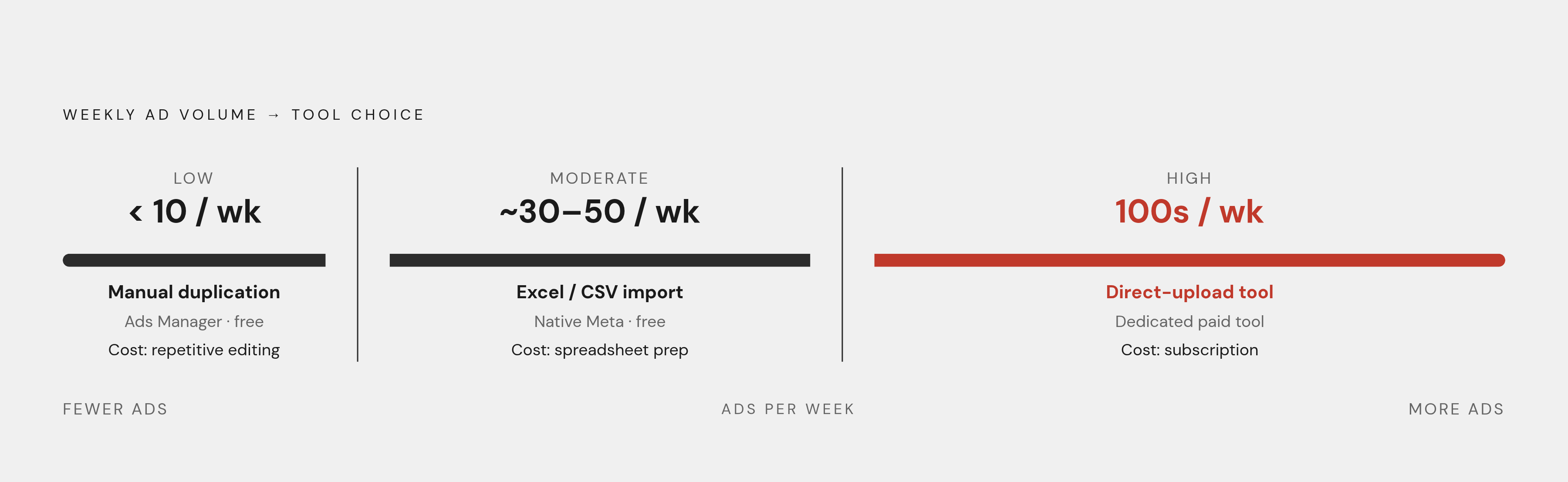
Under roughly ten ads per week, manual duplication is usually enough. For a few dozen ads occasionally, native Meta Excel/CSV import becomes useful. For dozens to hundreds every week, a dedicated direct-upload tool is the practical choice. Each method has a different cost structure, measured in repetitive editing, spreadsheet preparation, or paid tooling.
The distinction starts with what “bulk” actually means. Bulk media upload gets raw assets into the account, bulk ad creation builds ads that use those assets, and bulk launch publishes the ads in the right ad sets. Uplads identifies the seams between these jobs as the source of friction. Speed also concentrates risk. A wrong setting in one ad built by hand affects only that ad, but a bad value repeated in a bulk file can spread across hundreds of ads.
What manual duplication in Ads Manager actually covers and where it stops being rational
Manual duplication makes sense for roughly ten to fifteen ads, especially when the changes are small. In Ads Manager, select a campaign, ad set, or ad, choose Duplicate, edit the copies, and publish. It suits three to five variations on a proven structure or a new creative that keeps existing targeting. There is no prize for complicating that job.
Shared edits do not remove the work of assigning different creatives, copy, and names to individual ads. Each new variation takes another round of clicking. Across a large batch, wrong budgets, mismatched creatives, and inconsistent names make both setup and later analysis harder. That is when a spreadsheet earns its place.
How the native Meta Excel/CSV import works and what it requires before the file even opens
Meta’s native importer is free and capable. On desktop, it sits under More in Ads Manager, through Import ads in bulk. That menu provides a blank template, while exporting an existing campaign gives you a file with its structure already populated. Some teams still call it the “Power Editor template” because the feature came from the retired Power Editor.
The spreadsheet references media. Images must already be in the account’s media library, with their image hashes recorded. Videos must be uploaded and processed before Meta assigns the video IDs the rows need. This sequence is not optional.
For a practical export-and-reimport loop, start with an existing campaign, upload the new assets, and record their references. Draft the new copy outside the spreadsheet, then paste it into the exported template with the destination URLs and media references. Preserve the template’s exact column names. Blank ID fields create new objects, while populated ID fields update existing ones, so clearing or retaining those values is a consequential choice. Meta processes the file row by row, allowing creation and updates in the same import.
The fields needing close attention include object IDs, image hashes, video IDs, ad names, copy, and destination URLs with their UTM parameters already attached. Google Sheets can serve as the planning file if its headers map exactly to the Ads Manager format, and Google Apps Script can automate CSV formatting. Reviewers can then audit the structure before export. After launch, budget, bid, schedule, targeting, and status can be edited inline without re-uploading. Changes to creative and objectives need a re-upload or a fuller rebuild.
Where the native spreadsheet method breaks under high volume — and why video is usually the trigger
The native method starts losing its advantage at dozens to hundreds of ads every week, especially with video. With its file cap of approximately 2 MB and its ten-video limit per import, larger batches must be split into separate files. Splitting creates more preparation and more error correction. These are design limits.
Video exposes the problem first because every asset must clear upload and processing before its ID can enter the sheet. At volume, managing that queue can dominate launch preparation. The spreadsheet also enforces neither naming conventions nor placement rules, and it provides no visual preview before publishing. A valid row can therefore still assign the wrong creative.
With those limits, experienced advertisers often use the native tool for bulk edits. Changing budgets, statuses, and bid caps avoids much of the media preparation. New ads demand hash lookups, filename matching, and repeated error correction after upload. Once those jobs consume the time the spreadsheet was supposed to save, a direct-upload workflow becomes the better fit.
What dedicated bulk upload tools handle that the native method cannot, and how to choose between them
Dedicated tools publish through the official Marketing API. They combine media upload and ad creation, bypassing the spreadsheet’s file-size and video-count limits. Depending on the tool, naming rules, templates, and approvals can also live inside the workflow. Some support post ID reuse to preserve likes and comments, which the native importer does not support. These capabilities deserve separate checks rather than an assumption that every launcher includes them.
Ads Uploader costs $59/month at a flat rate and provides drag-and-drop API uploads with support for many connected accounts. It fits teams that already make their own creative. There is no AI creative generation. AdManage.ai costs approximately £499/month and lets agencies launch ads at scale across Meta and TikTok with unlimited connected accounts, so the channels it covers are a reason to consider it.
AdEspresso, by Hootsuite, serves a different job. It creates combinations for structured A/B tests across Meta and Google Ads rather than primarily launching finished video creatives at high volume. Is the bottleneck launching completed assets, building test combinations, producing creative, or optimizing live campaigns? Those jobs should not be treated as interchangeable.
How to prepare assets, naming conventions, and the launch sequence before anything touches the upload tool
For execution, start with a master campaign sheet that maps every variation to its components. Include the ad name, creative filename, headline, primary text, description, call-to-action, destination URL, target audience, and UTM parameters. Write copy outside the sheet before pasting it in to reduce encoding errors. Add tracking parameters to destination URLs before uploading. Retrofitting them across live ads is harder.
For native imports, upload media and record hashes or IDs before constructing the file. Queue videos early enough to allow processing. Then check each asset reference against the intended ad and placement rather than treating a completed upload as proof that the mapping is right. A direct-upload tool skips the separate library step, but it does not decide whether the creative it receives belongs in the intended ad set.
Use consistent naming before the batch grows. Names are not just labels for a tidy account. They make a large set of variations filterable and interpretable later. The last check before anything goes live should cover the structure, which creative goes with each ad, URLs, and tracking. Corrections made in the sheet avoid re-upload work or manual changes to live campaigns.
Where the spreadsheet and manual tool workflow hit a ceiling that method-switching alone cannot fix
A faster launcher eventually exposes a different constraint. A team that can launch fifty ads in minutes still needs fifty distinct creative variants worth testing. Copywriting, image resizing, and video editing accumulate upstream, while feed, story, reel, and right-column placements add aspect-ratio work.
This is where launch efficiency stops being enough. Testing many variants rather than a handful depends on a production system that can supply them. Otherwise, the launch tool waits for creative, and the team loses upstream the time it saved downstream. AI creative automation addresses that separate constraint.
How AI-driven creative automation and campaign generation address the production bottleneck
AI creative systems can use existing performance data to generate variations from ads that already work. They can produce copy and creative, distribute assets across placement sizes, and feed the output into a launch workflow. Campaign-generation tools extend that work into targeting, creative selection, and budget allocation. A launcher moves finished assets, while a creative system helps make them.
Zendux starts at $27/month and generates image and video assets in the same tool that launches them. That combination fits teams whose creative supply is the constraint, rather than teams that only need to move completed files into Meta. The choice depends on where work stalls. Generation helps less when the creative pipeline already makes enough to keep the launcher supplied.
Adside is another option for teams shipping dozens to hundreds of ads weekly, combining AI-generated briefs, copy variants, audience targeting, and auto-resized creatives with campaign creation and launch across Meta, Google, LinkedIn, Reddit, and Twitter. It keeps production and launch in one interface rather than handing assets between a separate creative tool, spreadsheet, and launcher.
How competitor ad intelligence feeds the creative brief and closes the loop on high-volume testing
Generation needs direction as well as capacity. Competitor ad research gives teams signals about hooks, formats, landing pages, and testing cadence to inform the next brief. Meta Ad Library shows paid ads that are live or have run in the past, but it shows spend ranges for political and social issue ads only, leaving out standard commercial advertising. Google Ads Transparency Center shows the history of ads but does not show their budgets. No free tool shows exactly how much competitors spend on ads.
Paid tools address different research needs. Foreplay costs $175/month, and its Spyder tracks launches, active creatives, hooks, landing pages, and changes in competitor libraries. GetCrux connects enterprise competitor creative intelligence with a team’s own performance data. Sensor Tower Pathmatics has custom pricing and shows spend estimates, impressions, channel mix, and other signals from social and other advertising channels. Adbeat focuses on display and native buying, including publishers and networks such as Google Display Network, Taboola, Outbrain, and AdRoll.
An agent configured to examine major ad libraries on a schedule can surface week-over-week changes for the next creative brief. Those observations give generation a direction to test. They do not establish that a competitor’s visible ad will perform for another brand.
When autonomous AI agents replace the spreadsheet entirely — and what that actually requires
For sufficiently large operations, moving between tools can become the next bottleneck. An agent architecture connects an assistant such as Claude, ChatGPT, Gemini, or Cursor to ad APIs through a Model Context Protocol server. The operator gives instructions in natural language, with changes visible and approvable before execution.
Access determines what the agent can actually do. A read-only MCP connection supports reporting and recommendations but cannot execute campaign changes. With write-capable access, the agent can create campaigns, change budgets, and launch ads. For a safe setup, start read-only, then set up how approvals will work before allowing writes. Hosting arrangements and platform-specific permissions also need evaluation for a connection carrying an “MCP” label.
Birch, formerly Revealbot, brings together rules-based advertising automation and AI help, and has MCP access. AdControlCenter provides AI marketing agents and a dashboard spanning Google, Meta, Reddit, TikTok, LinkedIn, and X, but multi-channel coverage alone does not establish a particular MCP server’s capabilities. This route requires setup investment, reliable context, and technical ownership, making it excessive for a small occasional batch.
A decision framework for matching your operation to the right method and tool
Choose the least infrastructure that removes the current bottleneck. Small batches with small changes do not need an agent architecture, while teams that often launch lots of video ads should not have to keep splitting files. When there is too little creative, look at generation. Where multiple channels create repeated setup work, assess a unified workflow against the cost of maintaining separate tools.
Before choosing, audit the operation. How many ads ship each week, and what is projected in three to six months? How much of that mix is video, and how many placements need separate assets? Does the team already produce enough creative, or must generation be part of the system? Is the operation Meta-only, or does it also span Google, LinkedIn, Reddit, or Twitter? If an agent is under consideration, does its connection support approved writes, or only recommendations?